SAP-certified · CMIS 1.1 · ArchiveLink

SAP documents.
Straight into SharePoint.

The CaRD Connector links SAP S/4HANA and SAP BTP with Microsoft SharePoint Online over the open CMIS 1.1 standard – ArchiveLink, SAP DMS and business metadata included. Certified by SAP, open to any CMIS application.

Runs on-premises or in the cloud · No changes to standard SAP processes

CMIS 1.1
Open OASIS standard
Certified
Officially by SAP
S/4 + BTP
On-premises & cloud
Millions
of documents per repository
SAP business documents shown as files with metadata columns and native preview in a SharePoint Online library, with the same repository browsed live in the Apache Chemistry CMIS Workbench

SAP documents in SharePoint Online — plus standards-compliant access from any CMIS client.

SAP

S/4HANA · SAP BTP · ArchiveLink · DMS

Microsoft 365

SharePoint Online · Microsoft Graph

Open standard

CMIS 1.1 · OASIS · Apache Chemistry

Cloud storage

Azure Blob · AWS S3 · STACKIT Cloud

Compatible with all SAP deployment models — S/4HANA on-premise, RISE with SAP, SAP BTP and SAP Public Cloud.

Why CaRD Connector

Your SAP archive belongs
where your teams work.

Documents in Microsoft 365

SAP receipts, invoices and attachments land directly in SharePoint Online: native browser preview, Microsoft Search, Teams integration and your tenant's permission and compliance tooling. Content stays entirely within your environment – data sovereignty included.

Certified by SAP

The connector passed SAP's official certification – including compliance scenarios such as legal hold. Verified in live operation with SAP S/4HANA on-premises and the SAP BTP Document Management Service.

Open standard, no lock-in

CMIS 1.1 Browser Binding per OASIS, compatible with Apache Chemistry / OpenCMIS. The same certified codebase also serves Azure Blob Storage and AWS S3 – switching backends is configuration, not a new project.

SAP documents flowing from SAP S/4HANA and SAP BTP through the CaRD Connector (CMIS 1.1) into a SharePoint Online document library
SAP S/4HANA and SAP BTP file documents through the open CMIS 1.1 standard – the CaRD Connector lands them in SharePoint Online for compliant archiving and fast access.

Features

Everything you need for productive SAP operations.

From classic ArchiveLink to CMISQL search across millions of documents – the connector covers the SAP content scenarios that actually occur in daily business.

ArchiveLink & SAP DMS, end-to-end

Two-step ArchiveLink filing, document info records (DMS) with original components, KPro flows and multifiling via object links: the connector handles SAP's real-world upload sequences – verified live against S/4HANA, including special-character file names and automatic routing into the right folder structure. Even older SAP systems connect through the classic ArchiveLink interface.

Business Object TypesJournalEntry0500000123Document.pdf

Native SharePoint preview

Files automatically receive the proper extension in SharePoint and open right in the browser – while the SAP-side document name stays untouched. SAP finds its components, users get real Office and PDF previews.

Business metadata as columns

Company code, document number and friends are maintained as indexed SharePoint columns – filterable, searchable, ready for reporting. The included REST API lets SAP enrich metadata after the fact, too.

Search in a split second

CMISQL queries run against a dedicated metadata index instead of folder trees – designed for millions of documents per repository, with fast property and full-text filters. SAP discovery queries (such as during repository setup) respond instantly.

SELECT * FROM sapbo:JournalEntry WHERE Name = '0500000123'

Enterprise security

Inbound: Basic, JWT, API key, mTLS and IP allowlist – combinable through a central auth gate. Outbound: app-only access to Microsoft Graph via certificate. Secrets stay in your infrastructure.

Compliance built in

Legal hold (records management) with delete protection, versioning via check-out/check-in – and protection against silent overwrites on name collisions.

Multi-repository

One installation serves several repositories in parallel – each with its own backend, its own authentication and its own type model. If one repository fails, the others keep running.

One connector, many cloud backends

The same certified codebase that connects SharePoint also serves Azure Blob Storage, AWS S3 and the STACKIT Cloud. Start with SharePoint and expand later without switching connectors.

SharePoint Online Azure Blob Storage AWS S3 STACKIT Cloud
A SharePoint Online library of SAP business documents with native preview, indexed metadata columns, CMISQL search and legal hold
SAP business documents in a SharePoint library – with native preview, indexed metadata columns, CMISQL search and legal hold.

SAP BTP & S/4HANA

Ready for SAP BTP – and for your on-premises S/4HANA.

Cloud-first through the Business Technology Platform, or a direct line to your existing S/4 system: the connector supports both routes. SharePoint Online is the destination either way.

Via SAP BTP Document Management Service

The connector acts as an external CMIS repository behind the SAP BTP Document Management Service (“Bring Your Own Repository”). This is the exact scenario the SAP certification was run in: your SAP cloud applications speak the SAP standard – SharePoint Online is the archive behind it.

  • Validated with SAP's official test suite
  • Apache-Chemistry-compatible CMIS interface
  • For S/4HANA Cloud, Fiori and CAP applications

Directly to SAP S/4HANA on-premises

Your S/4 system talks to the connector directly via ArchiveLink/CMIS – no BTP layer in between. Verified in live operation with a real S/4HANA: classic ArchiveLink filing, DMS uploads with original components, and KPro flows.

  • Classic ArchiveLink (two-step filing)
  • SAP DMS / document info records incl. components
  • Automatic routing by business object & instance

Beyond SAP

A general-purpose CMIS interface for SharePoint – not just for SAP.

Any CMIS client. One SharePoint backend.

The CaRD Connector is a full, standards-compliant CMIS 1.1 interface for SharePoint Online. Any CMIS-capable application – Apache Chemistry / OpenCMIS clients, ECM and DMS systems, or your own software – can file, search and manage documents in SharePoint through it. SAP is the flagship use case, not a prerequisite.

Apache Chemistry / OpenCMIS ECM & DMS systems Custom applications
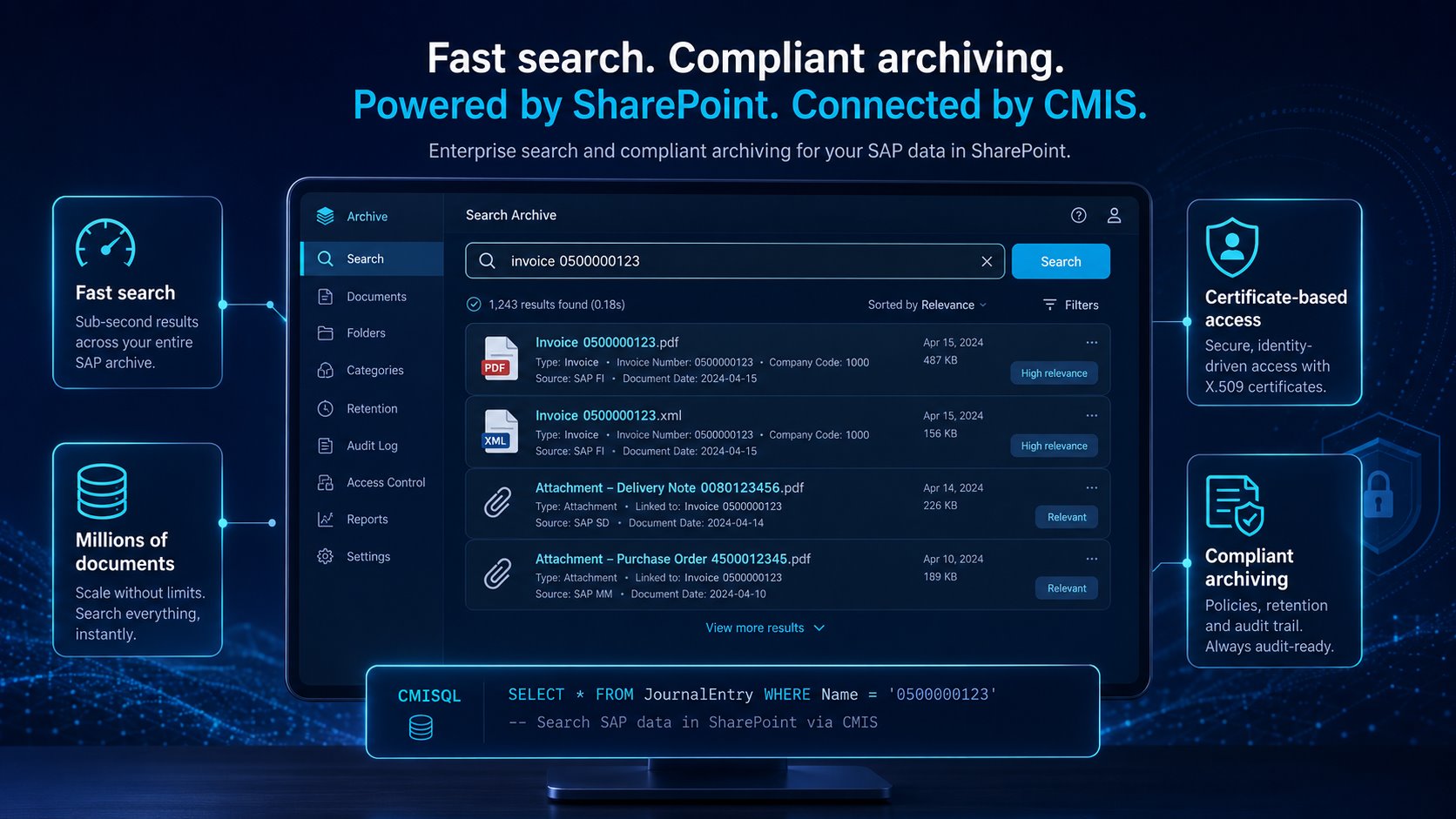
Sub-second CMISQL search across millions of archived SAP documents in SharePoint, with certificate-based access and a compliant audit trail
Fast search, compliant archiving: sub-second CMISQL queries across millions of documents, certificate-based access and an always-ready audit trail.
SAP Certified – Integration with SAP S/4HANA

Certification

Officially SAP-certified.

The CaRD Connector passed SAP's official certification for document management integration – without a single failure in the final certification run.

  • Full CMIS 1.1 type and property compliance
  • Legal-hold and compliance scenarios passed
  • Validated against the SAP BTP Document Management Service
  • Additionally verified live with SAP S/4HANA on-premises

The same test suite also ran successfully against the connector's Azure Blob and AWS S3 backends.

How it works

The path of a document.

SAP S/4HANA, SAP BTP or any other CMIS application files a document through the open CMIS 1.1 standard. The connector stores it in SharePoint Online via Microsoft Graph.

Architecture

Cleanly separated layers, one clean standard.

Clear separation: applications speak the open CMIS 1.1 standard, SharePoint is connected through Microsoft Graph, and an indexed metadata layer keeps search fast at any scale.

CaRD Connector architecture: SAP S/4HANA, SAP BTP DMS and any CMIS application connect via CMIS 1.1 to the connector, which stores content in SharePoint Online, with Azure Blob, AWS S3 and STACKIT as optional backends
The connector as a CMIS bridge between enterprise systems and SharePoint Online – with Azure Blob, AWS S3 and STACKIT as optional additional backends.

Technical facts

Protocol
CMIS 1.1 Browser Binding (JSON), OASIS standard
Client compatibility
Apache Chemistry / OpenCMIS, SAP and custom CMIS clients
SharePoint access
Microsoft Graph, app-only with certificate
Search
CMISQL on fully indexed metadata
Authentication
Basic · JWT · API key · mTLS · IP allowlist
Additional backends
Azure Blob Storage · AWS S3 · STACKIT Cloud

FAQ

Frequently asked questions.

What is CMIS and why does it matter?

CMIS (Content Management Interoperability Services) is an OASIS standard for accessing content repositories. SAP uses CMIS in the SAP BTP Document Management Service, among other places. The CaRD Connector implements CMIS 1.1 (Browser Binding), turning SharePoint Online into a standards-compliant SAP repository – with no proprietary interfaces.

Is the CaRD Connector certified by SAP?

Yes. The connector passed SAP's official test suite for document management integration – including compliance scenarios such as legal hold. On top of that, it is verified in live operation with SAP S/4HANA on-premises.

Does the connector work with SAP BTP, RISE and S/4HANA Public Cloud?

Yes. The CaRD Connector acts as an external CMIS repository behind the SAP BTP Document Management Service – the exact scenario in which the SAP certification was performed. It works the same way across every SAP deployment model: SAP S/4HANA on-premise, RISE with SAP and SAP S/4HANA Public Cloud. On-premises S/4HANA can also talk to the connector directly via ArchiveLink, without BTP.

Does the connector also work without SAP?

Yes. The CaRD Connector is a general-purpose CMIS 1.1 server for SharePoint Online. Any CMIS-capable client – such as Apache Chemistry / OpenCMIS or your own applications – can use it to store, query and manage documents in SharePoint; no SAP system is required.

Which SAP scenarios are supported?

Classic ArchiveLink (two-step filing), SAP DMS / document info records including original components, KPro flows, and multifiling via object links. Automatic routing files documents in a clean structure by business object and instance.

Do our documents stay in our own Microsoft 365 tenant?

Yes. The connector stores content directly in your SharePoint libraries; there is no intermediate store outside your infrastructure. Access is app-only via certificate through Microsoft Graph – your tenant's permissions and compliance rules apply unchanged.

How do SAP documents appear in SharePoint?

Like perfectly normal files: with the correct file extension, native browser preview and indexed metadata columns such as company code or document number. The SAP-side document name stays stable, so SAP can always find its components.

How does the solution scale?

Metadata and CMISQL queries run against a dedicated, fully indexed metadata store – independent of the folder structure. Searches stay fast even with millions of documents per repository.

Where does the connector run?

Either in your own infrastructure (on-premises) or in the cloud – as a lightweight service that requires no changes to SAP or SharePoint. Several repositories – even mixed SharePoint, Azure Blob Storage, AWS S3 and STACKIT Cloud – run in a single installation.

See the connector live – with your SAP and your SharePoint.

In a demo we walk through the complete flow: filing from SAP, native preview in SharePoint, metadata search via CMISQL. On request, also as a proof of concept in your environment.

Or email us at sales@card.de or call +49 6222 9256-911 · CaRD is an SAP service partner and a member of the Microsoft Partner Network.

Built on trusted platforms

Delivering SAP solutions since 1994 — and an SAP partner and Microsoft partner for almost as long.